

Billing & Subscription
Manage your Lumicast plan and payment details under Subscription in the navigation. The subscription belongs to your organisation and covers all of its workspaces.
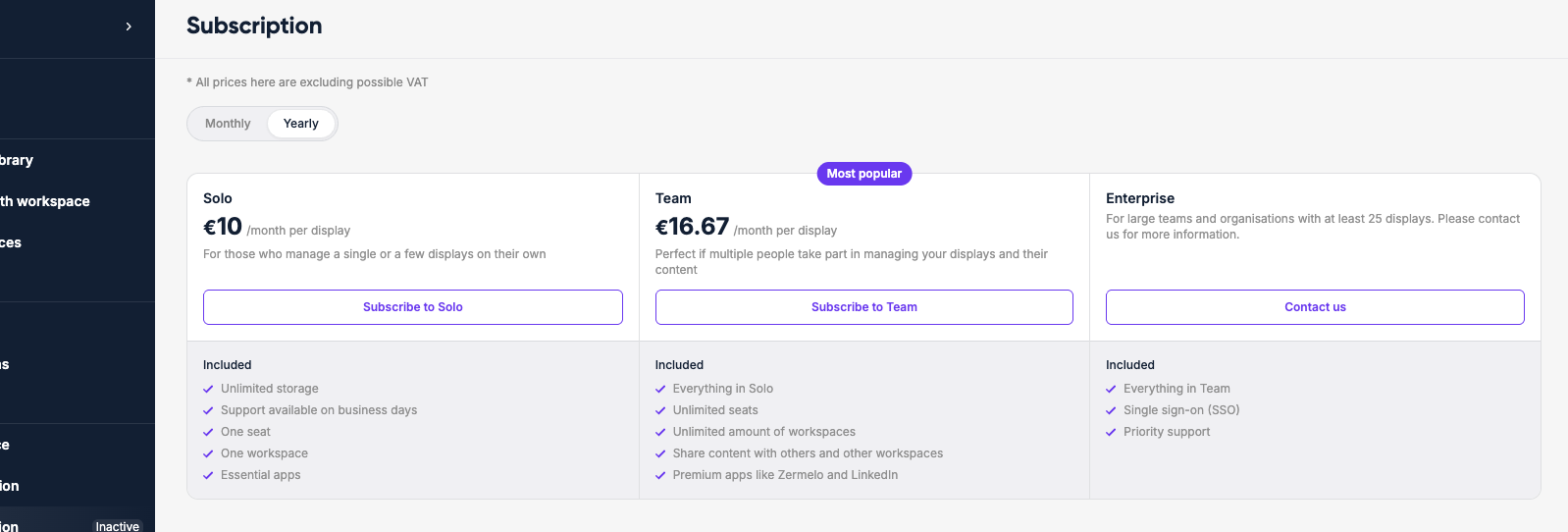
Plans
Lumicast offers three plans: Solo, Team and Enterprise. Solo and Team are priced per display per month; switch between Monthly and Yearly to compare — yearly plans include a discount. Enterprise is for organisations with at least 25 displays: click Contact us.
When you subscribe, you choose how many displays you need. To change the number of displays or the payment cycle later, click Update subscription. Extra displays are available right away; fewer displays take effect from your next billing period. To move to another plan, click Switch to Solo or Switch to Team.
Payment
Your current payment method is shown on the Subscription page. Click Change next to it to add or replace a card or another payment method. Payments are processed securely through Stripe.
Invoices
Click View invoices, payments and more to open the Stripe billing portal, where you can view and download your past invoices.
Display licenses
Each live display uses one display license; test displays are free and don't use one. Licenses are shared by all workspaces in your organisation. When they're all in use, you're asked to Upgrade subscription before you can add another live display — or you can create a test display instead.
Cancellation
Click Cancel subscription on the Subscription page and confirm in the Stripe billing portal. Your displays keep working until the end of the current billing period.